
How to Get SA302 Tax Calculations & Tax Year Overviews for Your Mortgage
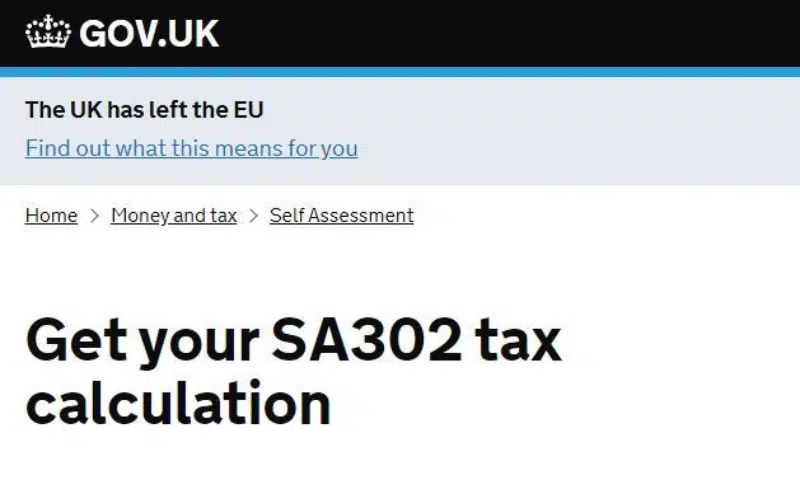
Get your Tax Calculations and Tax Year Overviews
If you’re self-employed or a limited company director applying for a mortgage, your lender may ask for SA302 Tax Calculations and Tax Year Overviews to support your income assessment. These documents help lenders understand the income you’ve declared to HMRC and check the corresponding tax information.
Need your Tax Calculations and Tax Year Overviews for your mortgage? Learn how to access them below, or talk to an adviser for assistance.
How Can You Access This Information?
HM Revenue & Customs (HMRC) provides the information online.
If you cannot access your documents online, contact HMRC for assistance. You can also ask your accountant for help obtaining the relevant tax calculations.
HMRC advises allowing 72 hours after submitting your Self Assessment return before downloading or printing your documents
Need help obtaining or reviewing your documents for your mortgage?
We specialise in self-employed mortgages and can guide you through the mortgage process, ensuring your tax documents meet lender requirements.
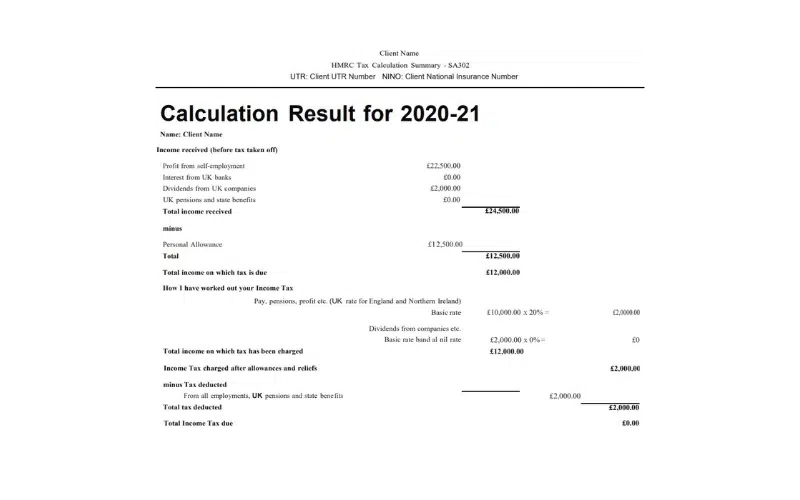
Step By Step To Obtain Your SA302s (Tax Calculations)
- Log into the HMRC online account
- Scroll down and Log In
- Select ‘Self Assessment’
- Follow the link ‘Get SA302 Tax Calculation for tax year 20xx to 20xx’
- Click ‘View your Calculation’
- Scroll to the bottom of the page
- Click ‘View and print your calculation’
- Select ‘Save as PDF‘
Step By Step To Obtain Your Tax Overview
An additional HMRC online document called a Tax Year Overview will be required to verify that the SA302 information is correct, whether you are using online or paper-based SA302s.
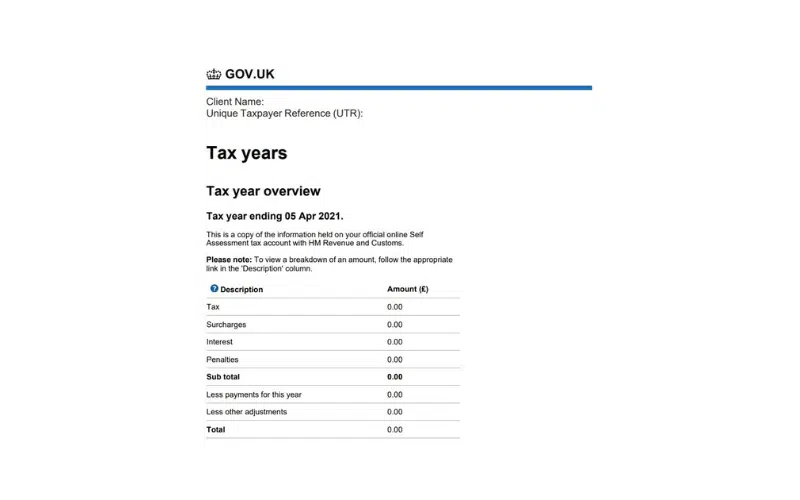
The Tax Year Overview is produced by HMRC after you have has submitted your self-assessment tax return. It shows the amount of tax due to be paid directly to HMRC or any available amount for a refund for a given tax year.
- Log into the HMRC online account
- Scroll down and Log In
- Select ‘Self Assessment’
- Follow the link ‘View Self Assessment return for tax year 20xx to 20xx’
- Select the appropriate tax year you require from the drop down box
- Click ‘Go’
- Scroll down and click ‘Print your tax year overview’
- Select ‘Save as PDF‘
What Are an SA302 and a Tax Year Overview? (Explained for Mortgages)
If you’re self-employed and applying for a mortgage, lenders will usually ask for two key documents to verify your income:
- SA302 (Tax Calculation)
- Tax Year Overview
Although they sound similar, they serve different purposes.
What is an SA302?
An SA302, also known as a Tax Calculation, shows a breakdown of your income for a specific tax year. It includes:
- Total income declared
- Taxable profits
- Dividends received
- Tax due
For mortgage purposes, lenders use the SA302 to verify your declared income. This helps them assess how much you can borrow.
What is a Tax Year Overview?
A Tax Year Overview provides a summary of your Self Assessment tax position for a particular tax year, including tax charged and payments recorded by HMRC.
Mortgage lenders may request this alongside your SA302 to check that the tax information provided corresponds with HMRC’s records. It does not show the same detailed income breakdown as an SA302.
Lenders ask for this alongside your SA302 to ensure the information is accurate and officially recorded by HMRC.
Why Do Mortgage Lenders Require Both?
Mortgage lenders want to:
- Verify your income is legitimate
- Check consistency across multiple years
- Confirm the figures submitted match HMRC records
In short, these documents help prove your income is stable, reliable and properly declared, this is essential for a self-employed mortgage application.
How Many Years of SA302s Do Lenders Typically Ask For?
Most lenders request:
- The last 2 years of SA302s and Tax Year Overviews
- Some may ask for 3 years
- A small number of specialist lenders may consider just 1 year
The more consistent your income appears, the stronger your application tends to be.
If your income has increased significantly in the latest year, some lenders may use the most recent figure, but others may average the last two years instead. Because criteria varies, it’s important to check which lenders are most suitable before submitting documents.
Alternative Ways to Get These Documents – Use an Accountant
If you’re struggling to download your SA302 or Tax Year Overview directly from HMRC, if you use an accountant, they can usually:
- Generate an SA302 directly from HMRC-recognised software
- Provide an accountant’s tax calculation summary
Some lenders accept accountant-generated documents, while others prefer them downloaded directly from HMRC. It’s always worth checking first.
Common Errors & Red Flags to Avoid
Submitting the wrong version of these documents can delay your mortgage application. Here are the most common mistakes we see:
Mismatch Between SA302 & Tax Year Overview
Your SA302 and Tax Year Overview should relate to the same tax year. The SA302 shows your declared income and tax calculation, while the Tax Year Overview provides information about your tax position recorded by HMRC.
If the documents appear inconsistent, or your tax return has subsequently been amended, the lender may request clarification or updated documents before proceeding.
Printing or Downloading Incorrectly
Common issues include:
- Missing pages
- Cropped PDFs
- Screenshots instead of full downloads
- Poor quality scans
Lenders need full, clear documents, not partial screenshots.
Missing HMRC Branding or Reference
Some lenders require:
- The HMRC logo
- Unique tax reference (UTR)
- Submission confirmation details
If these are missing, documents may be rejected.
Need Help Before You Submit These?
Self-employed mortgage applications can become delayed or declined simply because the wrong documents were uploaded. If you’re unsure whats required, which income figure the lender will use or whether your documents will be acceptable.
We can review everything before submission and guide you towards the lenders most likely to accept your income structure. Talk to us today!
Why Kerr & Watson?

Understanding
We take the time to understand your situation so that we can search for the most suitable mortgage and insurance for you. Any recommendation made is completely bespoke to your circumstances.

Experience
Mortgage and insurance advice is our speciality. We have decades of combined experience giving us the knowledge to overcome challenges and find the appropriate solution for your needs.

Communication
We work around your schedule to arrange a mortgage or insurance policy that suits your needs. You’ll be kept updated throughout the entire process with clear communication so you’ll always know what’s going on.
Featured In






Testimonials


Awards & Recognition







Contact Us
Free initial conversation. No obligation.
Not ready to apply yet? That’s fine — we can start with a quick conversation about your options.
We aim to respond within a few hours during working days.
By submitting this form you agree that Kerr & Watson may contact you regarding your enquiry.
Your information will be handled in accordance with our Privacy Policy.